
Listing Call Data from Multiple ServiceTitan Accounts🔗
As a ServiceTitan consultant, you're constantly juggling calls data across dozens of client accounts. Whether you're preparing monthly KPI dashboards, analyzing call performance for coaching sessions, or delivering dashboard updates to multiple clients, manual data exports from each ServiceTitan instance are eating up your billable hours.
TitanSigma transforms how consulting firms deliver ServiceTitan analytics. Instead of building custom dashboards for each client or wrestling with spreadsheet exports, you can instantly unify data from multiple ServiceTitan accounts using natural language queries—no coding required.
In this guide, we'll show you how to connect multiple client ServiceTitan accounts to TitanSigma and use our AI chatbot to instantly retrieve calls data for any client—turning hours of manual work into minutes of automated insights.
Setting Up Your ServiceTitan Connections🔗
Before you can query calls data for your clients, you'll need to connect their ServiceTitan accounts to TitanSigma. The process is straightforward and takes just a few minutes per client.
First, navigate to the Connections section in your TitanSigma workspace and select ServiceTitan from the available integrations. You'll need API credentials from each client's ServiceTitan admin panel—most clients can generate these quickly with your guidance.
Once connected, TitanSigma will automatically sync each client's ServiceTitan data, including calls records, customer information, and call tracking data. This gives you immediate access to query calls data across your entire client portfolio from a single workspace.
For detailed step-by-step instructions, check out our comprehensive guide: Connect your ServiceTitan Account to TitanSigma
Getting Client Calls Data in 4 Simple Steps🔗
Once your clients' ServiceTitan data is flowing into TitanSigma, retrieving calls information for any client becomes incredibly straightforward. Here's how to pull calls data from multiple client accounts:
Step 1: Write your query🔗
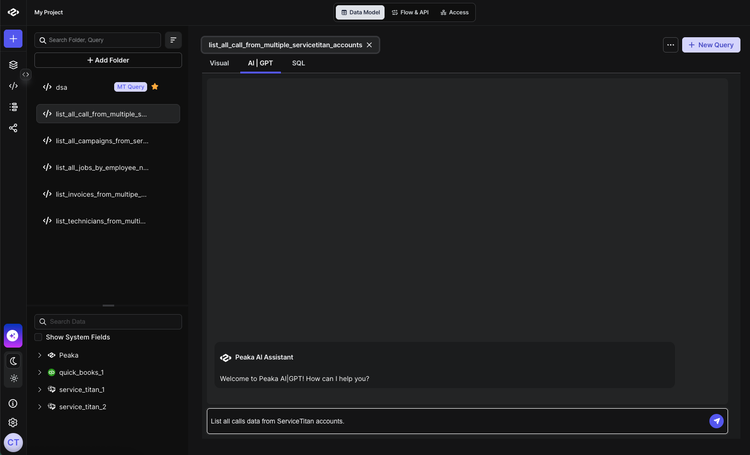
Navigate to your TitanSigma workspace and create a new query. Select the AI|GPT section to access our natural language query interface.
Pro tip: New to TitanSigma queries? Check out our comprehensive guide to get up to speed.
Step 2: Ask in natural language🔗
Simply type your request in natural language. For example:
List all calls from all of my ServiceTitan accounts.
Step 3: Select your data sources🔗
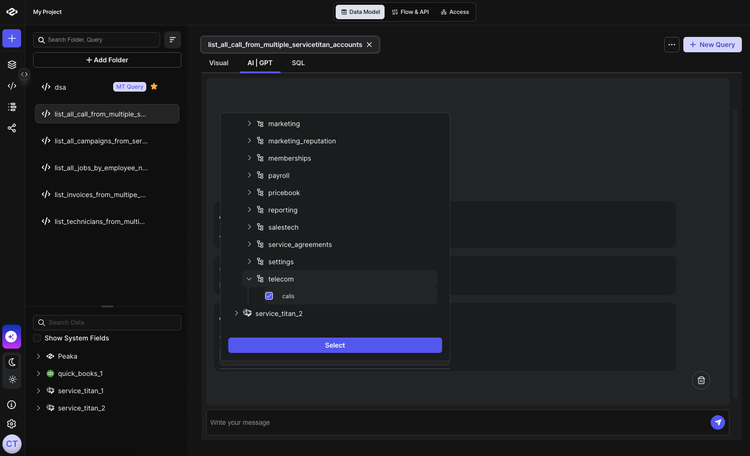
TitanSigma will automatically suggest the relevant tables. For calls data, you'll typically need:
- Calls Table:
your_service_titan_connection > telecom > calls
Step 4: Execute and analyze🔗
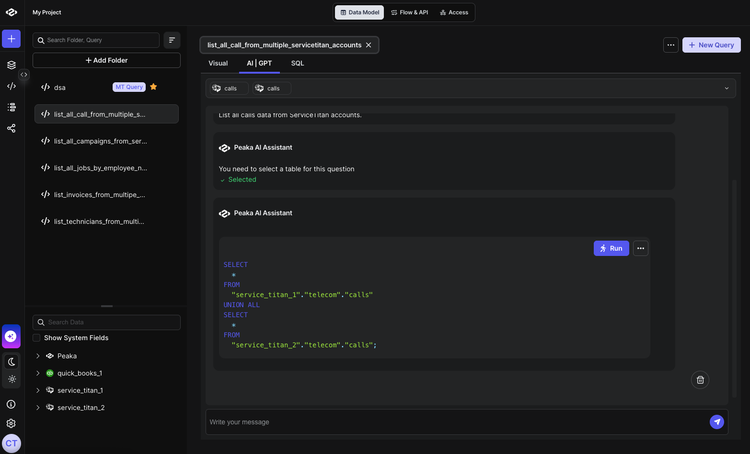
Hit run and watch TitanSigma generate the SQL query behind the scenes. Your results appear instantly, showing all calls from your client's ServiceTitan account with complete details—ready to drop into your monthly KPI report or coaching session.
Conclusion: Deliver premium analytics without the overhead🔗
As a ServiceTitan consultant, your time should be spent coaching clients and growing your practice—not wrestling with data exports and dashboard builds. With TitanSigma's AI chatbot, you can deliver professional calls analytics to any client in minutes, not hours.
Whether you're preparing monthly KPI reports, analyzing call performance trends, or building premium dashboard offerings, you now have the tools to scale your consulting practice without hiring developers or learning complex BI tools.
Ready to transform your ServiceTitan reporting workflows? Check out our complete ServiceTitan Reporting Cookbook for more step-by-step guides:
-
How to List Invoice Data Across Multiple ServiceTitan Accounts
-
Listing All Jobs for an Employee in ServiceTitan Using TitanSigma
For a complete end-to-end roadmap on ServiceTitan integrations, dashboards, and unifying multi-location data, read our comprehensive guide on multi-location ServiceTitan reporting.
Book a quick demo and see how TitanSigma can help simplify ServiceTitan reporting for you and your clients.