
How to List Invoice Data Across Multiple ServiceTitan Accounts🔗
Managing invoice data across multiple ServiceTitan accounts is a common challenge for PE firms and multi-location service businesses. Whether you're consolidating financial reports, analyzing revenue trends across brands, or preparing investor updates, you need an efficient way to pull invoice data from all your ServiceTitan instances.
TitanSigma offers multiple ways to access and analyze your ServiceTitan data—through SQL queries, table views, or our AI chatbot. This flexibility means you can get the consolidated invoice data you need from multiple accounts, regardless of your technical background.
In this guide, we'll walk you through connecting multiple ServiceTitan accounts to TitanSigma and use our AI chatbot to instantly retrieve and consolidate invoice data across your entire portfolio—no SQL required.
Setting Up Your ServiceTitan Connections🔗
Before you can query employee job data, you'll need to connect your ServiceTitan account to TitanSigma. The process is straightforward and takes just a few minutes.
First, navigate to the Connections section in your TitanSigma workspace and select ServiceTitan from the available integrations. You'll need your ServiceTitan API credentials, which you can generate from your ServiceTitan admin panel.
Once connected, TitanSigma will automatically sync your ServiceTitan data, including employee records, job assignments, and scheduling information. This gives you immediate access to query any employee's job history through our platform.
For detailed step-by-step instructions, check out our comprehensive guide: Connect your ServiceTitan Account to TitanSigma
Getting Invoices Data in 4 Simple Steps🔗
Once your ServiceTitan data is flowing into TitanSigma, retrieving invoice information becomes incredibly straightforward. Here's how to pull all invoices from multiple ServiceTitan accounts:
Step 1: Start a New Query🔗
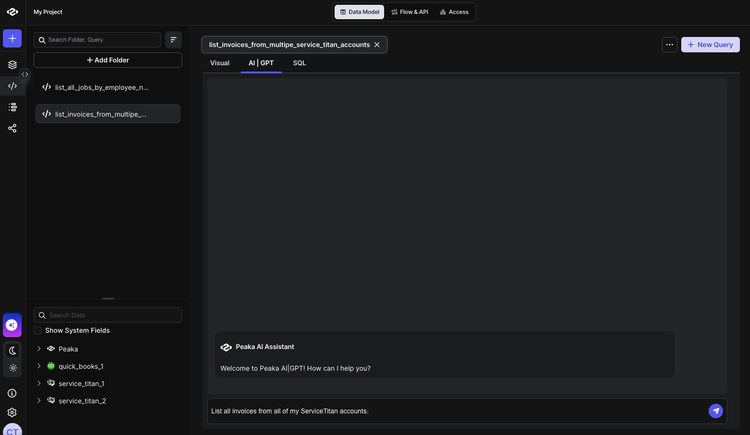
Navigate to your TitanSigma workspace and create a new query. Select the AI|GPT section to access our natural language query interface.
Pro tip: New to TitanSigma queries? Check out our comprehensive guide to get up to speed.
Step 2: Ask in Plain English🔗
Simply type your request in natural language. For example:
List all invoices from all of my ServiceTitan accounts.
Step 3: Select Your Data Sources🔗
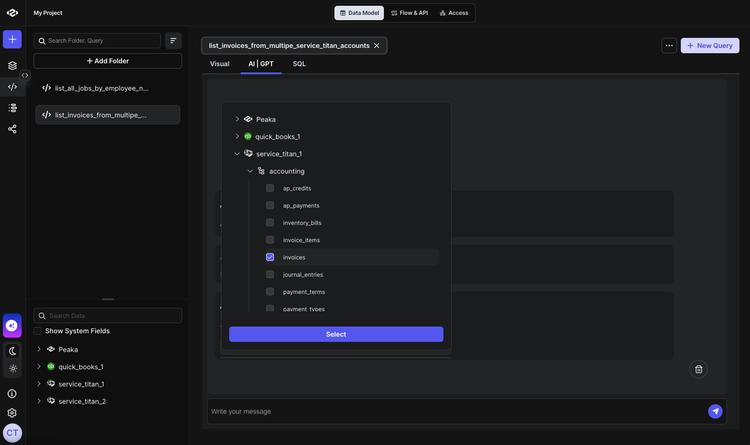
TitanSigma will automatically suggest the relevant tables. For employee job data, you'll typically need:
- Invoices Table:
your_service_titan_connection > accounting > invoices
Step 4: Execute and Analyze🔗
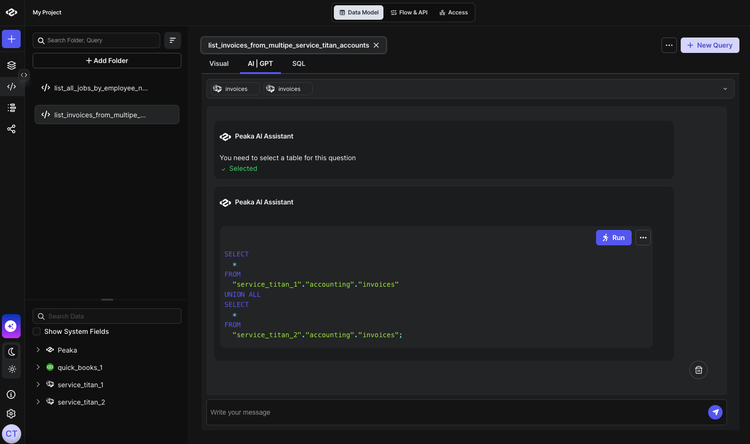
Hit run and watch TitanSigma generate the SQL query behind the scenes. Your results appear instantly, showing all jobs assigned to your specified employee with complete details.
Conclusion: Less data wrestling, more strategic thinking🔗
With TitanSigma's AI chatbot, you can instantly pull invoice data from multiple ServiceTitan accounts using simple prompts—no SQL or manual exports needed. Get immediate insights for better financial reporting and portfolio-wide invoice analysis.
Ready to streamline more ServiceTitan workflows? Explore our complete ServiceTitan Reporting Cookbook for more step-by-step guides:
For a complete end-to-end roadmap on anything and everything ServiceTitan, read our comprehensive guide on multi-location ServiceTitan reporting.
Book a quick demo and see how TitanSigma can help simplify ServiceTitan reporting for you and your clients.