
Tracking Outstanding AR in ServiceTitan vs Xero (AR Aging)🔗
Collections work best when everyone is calling from the same list. If ServiceTitan shows an invoice open but Xero Accounting shows it paid, your team wastes time chasing ghosts. If the opposite happens, real overdue balances slip.
This guide starts with the outcome: One actionable outstanding AR (Accounts Receivable) list you can trust. You will pull unpaid invoices, align customer and invoice identifiers across systems, and surface mismatches that need attention before a collector spends time following up.
The result is a clear, audit-friendly AR view in TitanSigma that helps you prioritize outreach, reduce back-and-forth, and keep ops and accounting aligned.
Listing Outstanding AR in 4 Simple Steps🔗
Once ServiceTitan and Xero data are in TitanSigma, you can run the comparison in a few steps.
Step 1: Start a New Query🔗
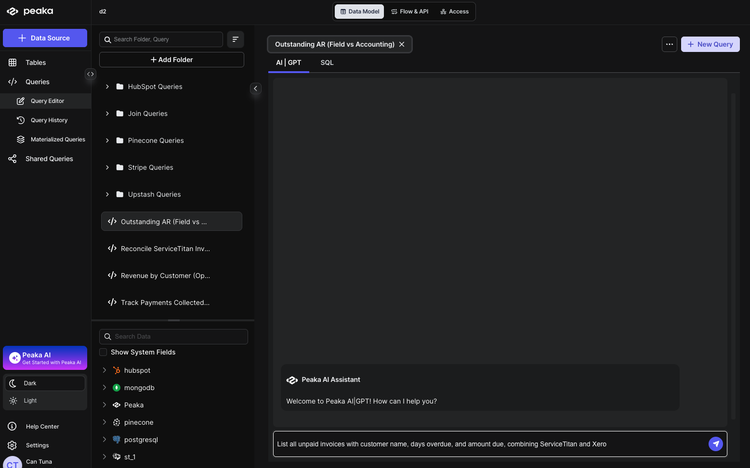
Open your TitanSigma workspace and create a new query. Choose the AI|GPT section to use the natural language interface.
Pro tip: New to TitanSigma queries? Check out our comprehensive guide to get up to speed.
Step 2: Ask in Plain English🔗
Enter your request in natural language. For example:
List all unpaid invoices with customer name, days overdue, and amount due, combining ServiceTitan and Xero.
Step 3: Select Your Data Sources🔗
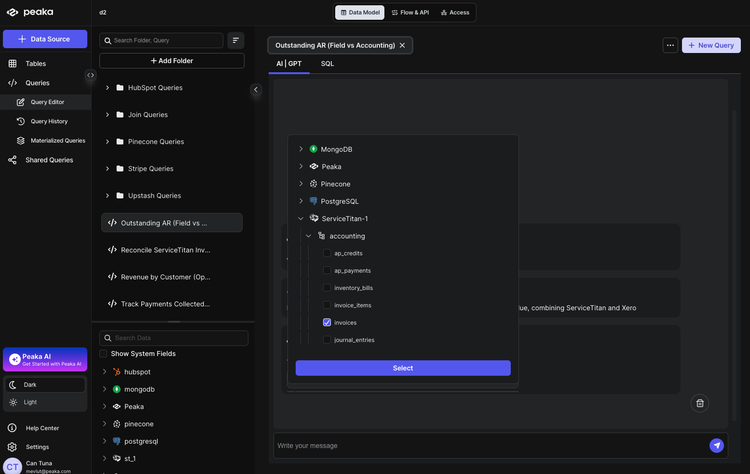
TitanSigma will suggest the relevant tables. For this view you'll typically use:
ServiceTitan
- Invoices —
your_service_titan_connection > accounting > invoices - Customers —
your_service_titan_connection > crm > customers
Xero Accounting
- Invoices —
your_xero_connection > accounting > invoices - Contacts —
your_xero_connection > accounting > contacts
The logic: match invoices by InvoiceNumber between ServiceTitan and Xero, filter to unpaid status in both systems, join to customers/contacts for name, and calculate aging (days overdue from due date to today).
Step 4: Execute and Analyze🔗
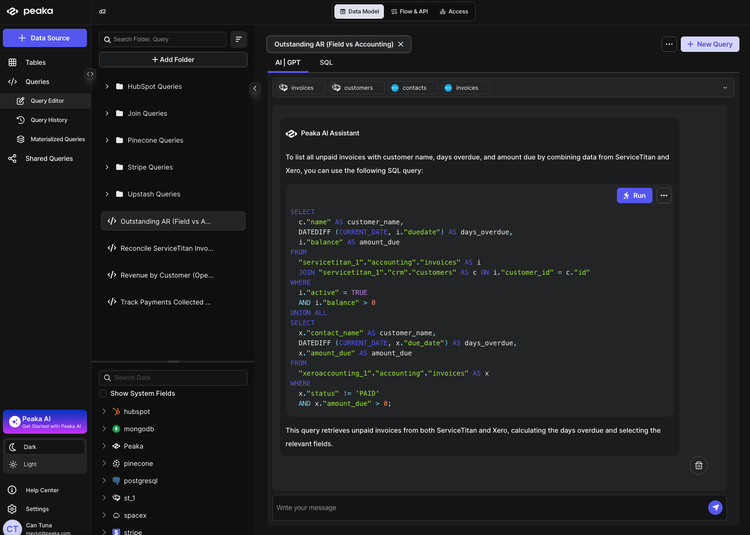
Run the query. TitanSigma generates the SQL and returns a result set showing unpaid invoices with customer name, days overdue, and amount due from both systems.
Use the output to quickly spot:
- Unpaid invoices in both systems — same invoice number, unpaid in ServiceTitan and Xero, with balance/amount due and days overdue.
- Discrepancies — unpaid in one system but paid or missing in the other; different amounts due.
- Aging — prioritize by days overdue for collections follow-up.
Conclusion: Turn AR into an action list🔗
With TitanSigma's AIThe collections team does not need more data. It needs clarity.
Use the reconciled AR view to decide what gets called today, what gets investigated, and what can be ignored because it is already resolved in the other system. When the team works from one list, you reduce wasted outreach and missed balances at the same time.
Make it part of your operating rhythm, and AR will no longer be a stressful monthly event. chatbot, you can list outstanding AR from ServiceTitan and Xero using a single prompt—no SQL or spreadsheet exports. Get a clear view of what's unpaid in both systems so collections can prioritize and keep field and accounting in sync.
If you're looking to simplify more of your ServiceTitan workflows, read our ServiceTitan reporting guides:
-
How to Reconcile ServiceTitan & Xero Invoices (Step-by-Step)
-
Track Payments Collected vs Deposited in ServiceTitan & Xero)
-
How to List Invoice Data Across Multiple ServiceTitan Accounts
-
Listing All Jobs for an Employee in ServiceTitan Using TitanSigma
If you are looking for a more comprehensive solution, check out our guide on multi-location ServiceTitan reporting.
Book a quick demo and see how TitanSigma can help simplify ServiceTitan reporting for you and your clients.