
Track Payments Collected vs Deposited in ServiceTitan & Xero🔗
A payment collected in the field is not the same thing as a payment deposited in the bank. Between partial payments, batching, timing, and posting mistakes, it is easy for “we collected it” to turn into “why is it not in Xero yet?”
This guide is built for the weekly check you wish took five minutes. You will create a side-by-side view of ServiceTitan payments and Xero Accounting deposits, then isolate the gap: collected but not deposited, deposited with no matching collection record, and items that are simply delayed by timing.
You will do it in TitanSigma without exporting files, manually matching rows, or maintaining a fragile spreadsheet template.
Comparing Payments in 4 Simple Steps🔗
Once ServiceTitan and Xero data are in TitanSigma, you can run the comparison in a few steps.
Step 1: Start a New Query🔗
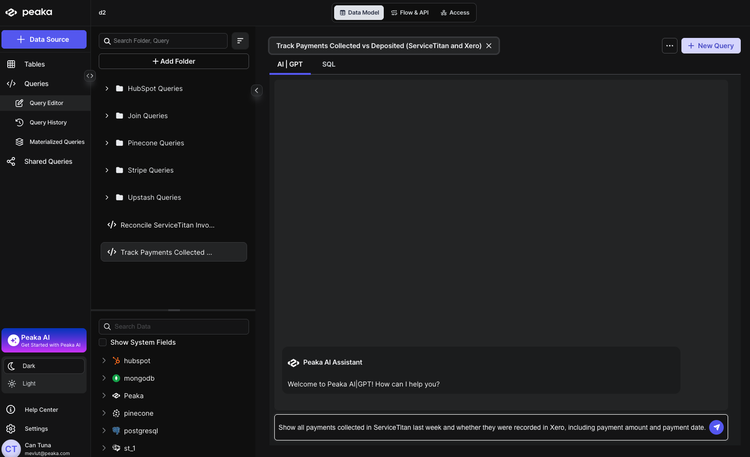
Open your TitanSigma workspace and create a new query. Choose the AI|GPT section to use the natural language interface.
Pro tip: New to TitanSigma queries? Check out our comprehensive guide to get up to speed.
Step 2: Ask in Plain English🔗
Enter your request in natural language. For example:
Show all payments collected in ServiceTitan last week and whether they were recorded in Xero, including payment amount and payment date.
Step 3: Select Your Data Sources🔗
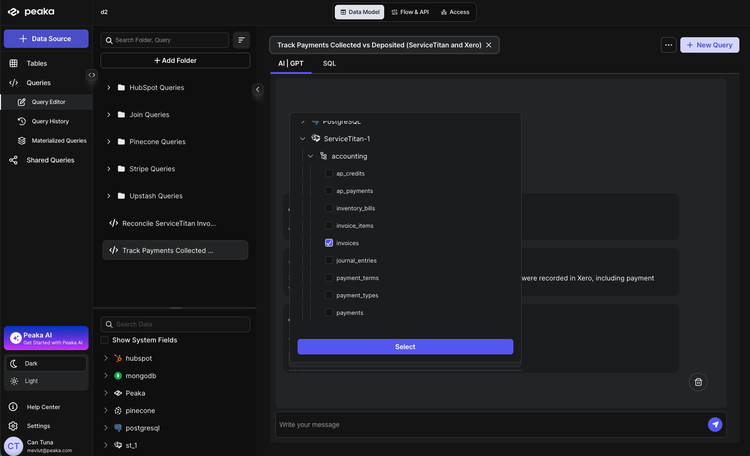
TitanSigma will suggest the relevant tables. For this comparison you'll typically use:
ServiceTitan
- Payments —
your_service_titan_connection > accounting > payments - Invoices —
your_service_titan_connection > accounting > invoices
Xero Accounting
- Payments —
your_xero_connection > accounting > payments - Invoices —
your_xero_connection > accounting > invoices
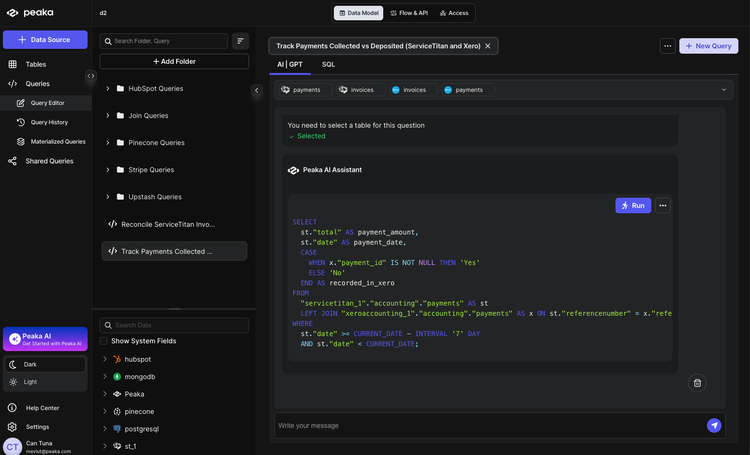
The logic: join by InvoiceNumber (via each system's invoice table), then compare payment amounts and payment dates to identify payments collected but not recorded, and partial vs full payments.
Step 4: Execute and Analyze🔗
Run the query. TitanSigma generates the SQL and returns a result set showing which ServiceTitan payments have a matching record in Xero and where they match or differ.
Use the output to quickly spot:
- Payments collected but not recorded — in ServiceTitan with no corresponding Xero payment.
- Partial vs full payments — same invoice but different amounts or multiple payments in one system vs the other.
- Date mismatches — payment date in the field vs deposit/recording date in Xero.
Conclusion: Follow the money trail, end to end🔗
You collected the payment. So why is the deposit not showing up the way you expect?
This guide gives you a practical way to trace the path from collection to deposit and separate normal timing from real issues. Once you can categorize the gap, the follow-up becomes obvious and fast.
Run it weekly. The value is not just cleaner books. It is fewer surprises, fewer internal debates, and tighter cash visibility.
Check out our ServiceTitan reporting guides for more step-by-step playbooks:
-
How to Reconcile ServiceTitan & Xero Invoices (Step-by-Step)
-
How to List Invoice Data Across Multiple ServiceTitan Accounts
-
Listing All Jobs for an Employee in ServiceTitan Using TitanSigma
If you are looking for a more comprehensive solution, check out our guide on multi-location ServiceTitan reporting.
Book a quick demo and see how TitanSigma can help simplify ServiceTitan reporting for you and your clients.